

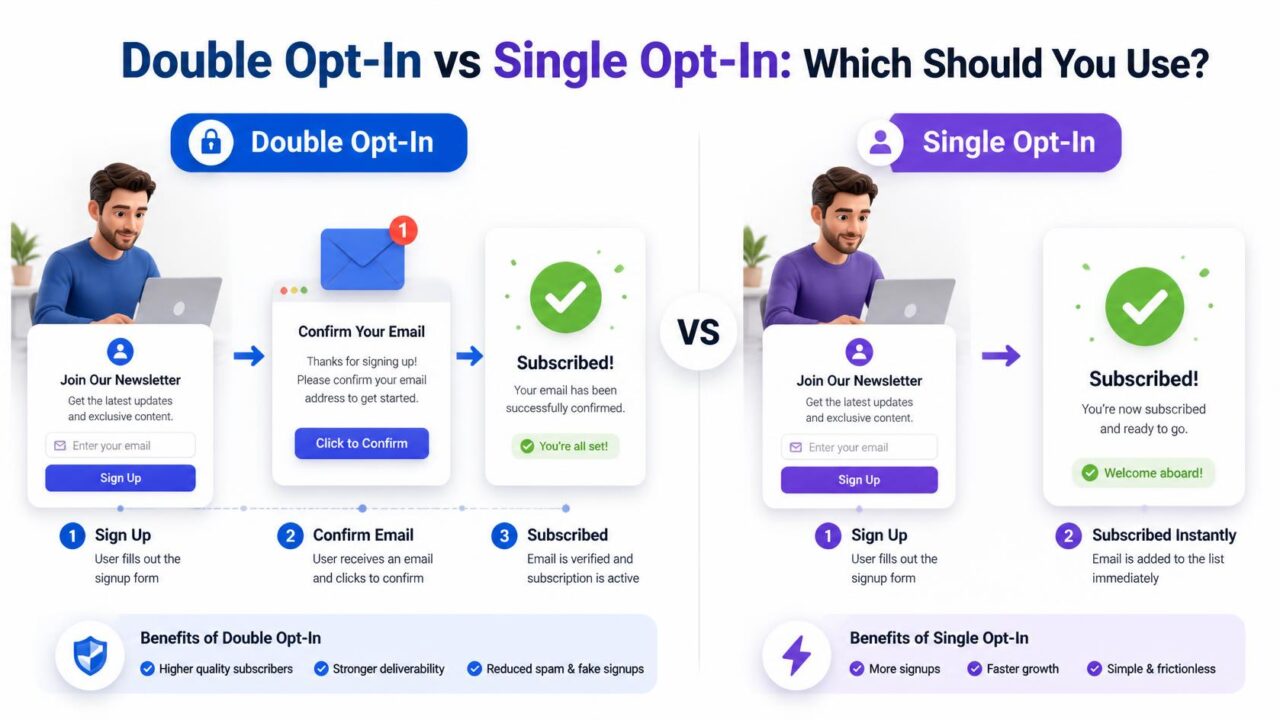
Quick answer: comparing double opt-in vs single opt-in comes down to a trade-off between list quality and list size. Double opt-in requires a confirmation click before someone’s fully subscribed, which filters out typos, fake signups, and people who changed their mind, at the cost of losing some real subscribers who never click confirm. Single opt-in adds people the moment they submit the form, growing your list faster but carrying more risk of bad addresses and complaints. Most senders who care about deliverability, not just list size, choose double opt-in.
What double opt-in and single opt-in actually mean
Single opt-in adds someone to your list the instant they submit a signup form, no extra step required. Double opt-in adds one more step: after submitting, the person receives an email asking them to click a confirmation link, and only after that click are they actually added to your active list. Everything else about the two approaches follows from that one difference.
Why double opt-in exists in the first place
A confirmation click does something a signup form alone can’t: it proves the address is real and that a person with access to that inbox actually wants to hear from you. Someone who mistypes their address, someone else’s address entered by mistake, or a bot filling out a form automatically will never complete that second step, which means none of those problem cases ever become part of your active list in the first place.

The real cost of double opt-in: confirmation drop-off
This is the honest downside, and it’s worth being upfront about it. Not everyone who submits a signup form goes on to check their inbox and click a confirmation link, some get distracted, some never see the email because it landed in spam, and some simply change their mind in the gap between submitting and confirming. Drop-off rates vary by list and industry, but losing a meaningful share of initial signups at the confirmation step is normal, not a sign anything is broken. The people you lose here are disproportionately the ones least likely to have engaged anyway.
What single opt-in actually risks
- Typos become permanent contacts. A mistyped address gets added immediately, with no chance for the person to catch and fix their own mistake.
- Bots and fake signups get through. Nothing stops an automated form submission from becoming a “real” subscriber.
- Spam complaints rise. People sometimes forget submitting a form weeks earlier, and without ever having confirmed interest explicitly, they’re more likely to mark your first email as spam rather than recognize and welcome it.
- Your list looks bigger than it actually is. A larger raw number that includes unconfirmed, disengaged, or fake contacts isn’t actually a stronger list, it’s a less accurate one.
Does single opt-in actually hurt deliverability?
Indirectly, yes, through the mechanisms above rather than as a direct penalty. A single opt-in list tends to carry more typos, more disposable or fake addresses, and a higher share of contacts who don’t remember or recognize you, all of which show up later as higher bounce rates and higher spam complaints, the two signals that most directly damage sender reputation. Single opt-in itself isn’t the problem mailbox providers penalize, the downstream engagement and complaint patterns it tends to produce are.
Can you get single opt-in’s speed without its risk?
Partially. Running an email checking tool on your signup form catches typos, disposable addresses, and clearly fake entries at the moment of submission, without requiring the person to leave the page or check their inbox. It’s not a full substitute for double opt-in, since it can’t confirm the person genuinely wants to hear from you the way a confirmation click does, but it closes much of the technical gap between the two approaches. See what email verification actually checks for what this catches specifically.
Which one do major email platforms actually recommend?
Most major email marketing platforms, including Mailchimp and others, recommend or default new accounts toward double opt-in specifically because of its impact on long-term deliverability, even though it’s not always a strict requirement. Some platforms apply stricter sending rules or reduced trust to accounts they can identify as running single opt-in at scale, particularly for cold or unfamiliar lists.
What the confirmation email itself should say
A weak confirmation email is one of the biggest, and most fixable, reasons double opt-in drop-off ends up higher than it needs to be. The email should arrive within seconds of signup, use a subject line that plainly states an action is needed, something like “Confirm your subscription” rather than a vague greeting, and lead with a single obvious button rather than burying the confirmation link in paragraph text. Avoid loading this email with branding, extra offers, or multiple links, since anything that competes with the one action you need someone to take only increases the odds they get distracted and never click through.

Why the confirmation email sometimes never arrives
A meaningful share of “lost” double opt-in confirmations aren’t actually abandoned by the subscriber, they never see the email at all because it landed in spam or a promotions tab. This is more likely on a newer sending domain with little established reputation, which makes the first email a brand-new subscriber ever receives from you disproportionately important to get right. Keeping your sending domain warmed up, authenticated with SPF, DKIM, and DMARC, and free of spam-trigger language in that specific email measurably improves how many confirmations actually land in the primary inbox instead of quietly disappearing.
How double opt-in and verification work together, not against each other
These two approaches solve different halves of the same problem, and using both together beats picking one over the other. Verification at the point of signup, described in what email verification actually checks, catches typos and clearly fake or disposable addresses before a confirmation email is even sent, which means fewer confirmation emails bounce or go nowhere in the first place. Double opt-in then confirms genuine human intent on top of that already-cleaner input. Run only one of the two and you’re left with either real addresses nobody confirmed wanting, or confirmed intent sitting on top of some typos and dead addresses verification would have caught for free.
How to actually set up double opt-in without losing too many signups
Most of the drop-off blamed on double opt-in as a concept is really drop-off caused by a poorly executed confirmation step, and there’s a fair amount you can do to close that gap without abandoning the approach. Send the confirmation email immediately, not minutes later, since even a short delay gives the person time to move on to something else. Make the confirmation page itself, the one they land on after clicking, warm and clear rather than a bare “thank you,” so the moment feels complete rather than uncertain. And consider a single, gentle reminder email to anyone who hasn’t confirmed within 24 to 48 hours, since a meaningful share of people simply forgot rather than deliberately declined, and a reminder recovers some of that group without being pushy about it.
What this looks like on popular email platforms
Most major email marketing platforms build double opt-in in as a toggle rather than something you need to construct from scratch, Mailchimp calls it “double opt-in,” while other platforms sometimes label it “confirmed opt-in” or bundle it into their subscription workflow settings. The underlying mechanics are the same everywhere: a confirmation email fires automatically after signup, and the subscriber only moves to “subscribed” status after clicking through. Because it’s typically a built-in setting rather than custom development work, there’s rarely a strong technical reason to avoid it, the real decision is about tolerance for the resulting drop-off, not implementation difficulty.
When single opt-in is a reasonable choice
It’s not universally wrong. For a low-stakes internal newsletter, a community with an already-trusted, small audience, or a situation where every signup happens in person with a real human present, the risk single opt-in carries is much lower, since bots and typos are less likely in the first place. The decision should track your actual risk, not a blanket rule applied regardless of context.
What this means for your AdSense and content quality standing
List-building method might seem unrelated to your site’s own content quality, but the two connect more directly than they first appear. A site relying on a large, unconfirmed single opt-in list to drive traffic back to itself through spam-flagged or low-engagement email campaigns risks the kind of signals that damage overall domain reputation and trust, the same broad trust signals that factor into how platforms like Google evaluate a site for programs such as AdSense. A smaller, genuinely confirmed double opt-in list that consistently earns opens and clicks builds a healthier long-term signal than a larger list that mostly goes unread and occasionally gets marked as spam.

Frequently asked questions
What percentage of people typically abandon a double opt-in confirmation?
It varies widely by list and industry, but losing a meaningful share of initial signups at the confirmation step is normal. The people lost here are disproportionately the ones least likely to have engaged with future emails anyway.
Does single opt-in directly hurt deliverability?
Not directly, but indirectly through higher bounce rates and complaint rates, which are the signals mailbox providers actually penalize. Single opt-in tends to produce more of both.
Can you switch from single opt-in to double opt-in later?
Yes, most platforms allow this as a setting change going forward. It won’t retroactively confirm your existing contacts, so consider a re-engagement or re-confirmation campaign for your current list when you switch.
Which opt-in method do most email platforms recommend?
Most major platforms recommend or default toward double opt-in because of its long-term deliverability benefits, though it’s not always strictly required for every account type.
Does double opt-in reduce spam complaints?
Yes, meaningfully. Since every subscriber actively confirmed wanting your emails, they’re far less likely to forget signing up and mark a later email as spam, one of the main mechanisms behind double opt-in’s better long-term deliverability.
Should you use double opt-in for every type of list?
Not necessarily. It’s the safer default for cold or public-facing signup forms, but a small, already-trusted audience or an in-person signup process carries less risk, making single opt-in a reasonable, lower-friction choice in those specific situations.
Where to start
If you’re not sure which to choose, double opt-in is the safer long-term default for most senders. If you’re staying with single opt-in for speed, at minimum check every address at signup. PureListVerifier catches the typos and fake addresses double opt-in would otherwise filter out, without adding an extra step for your subscribers.

1 comment