

Quick answer
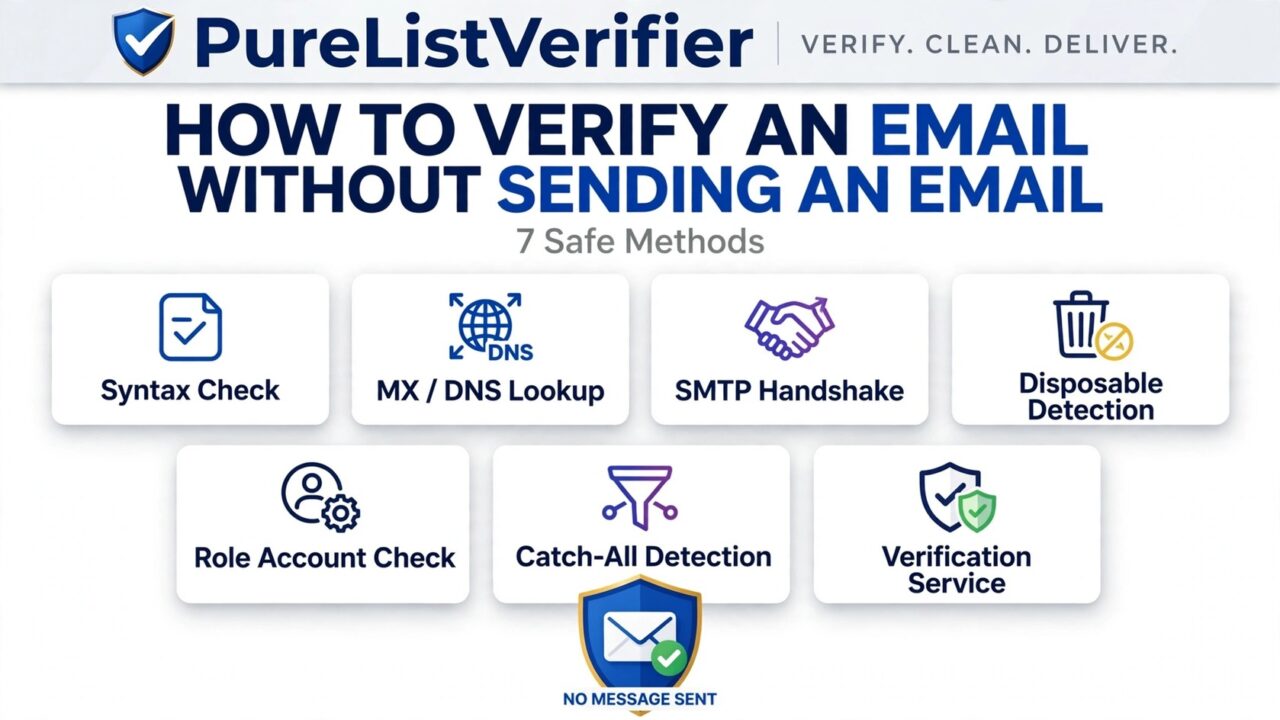
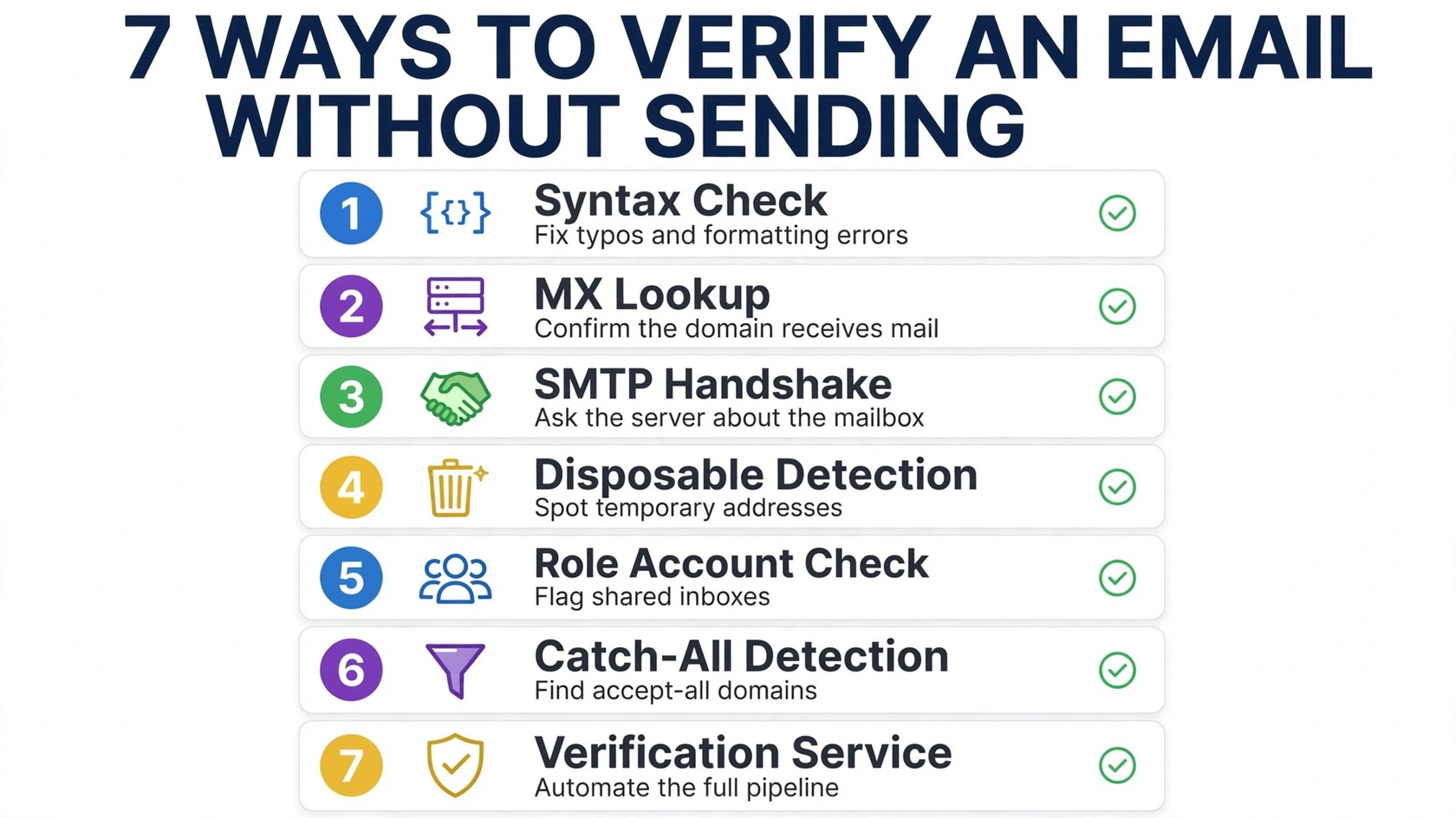
How to Verify an Email Address Without Sending: run the address through a layered check, syntax validation, a DNS/MX lookup on the domain, an SMTP handshake that asks the mail server whether the mailbox accepts delivery, and risk filters for disposable addresses, role-based accounts, and catch-all domains. Done together, these seven methods confirm whether an address is real and safe to contact, all without sending a single message.
In this guide we walk through each of the 7 safe methods in plain language, show where each one falls short on its own, and explain when it makes sense to let a dedicated verification service run all of them for you at scale.
Why verify an address without sending first?
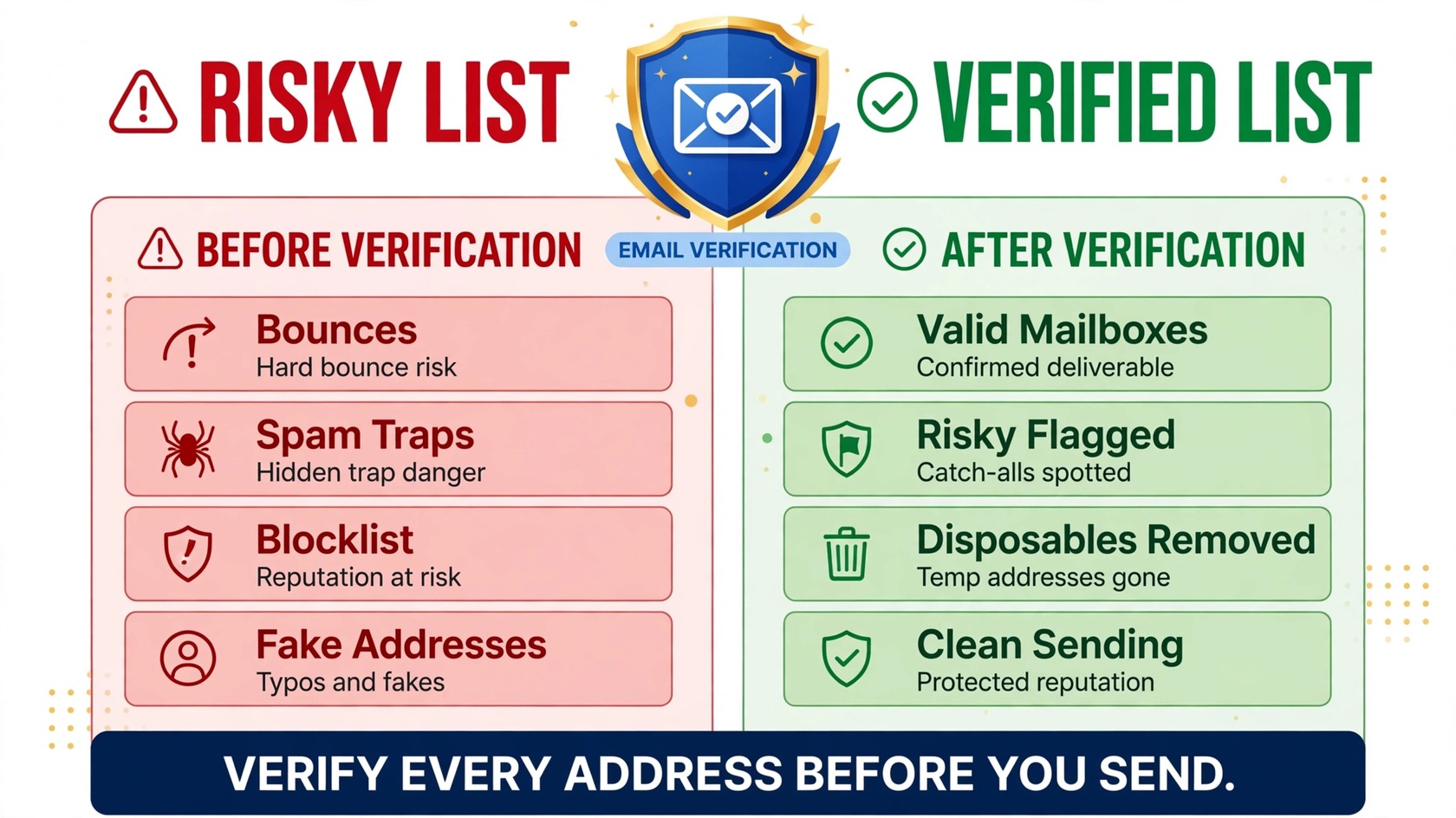
Every email you send to a dead or risky address works against you. Bounces tell mailbox providers your list is dirty, spam-trap hits can get your domain blocklisted, and sending to someone who never asked to hear from you burns the trust your deliverability depends on. Verifying first means your very first message lands like it was sent by a careful sender, because it was.
There are also very practical reasons. Cold outreach lists from lead databases, signup forms filled in a hurry, imported legacy lists, they all contain typos, abandoned addresses, and fake entries. Checking addresses before you press send protects your sender reputation, saves you wasted sends, and keeps your bounce rate in the safe zone. The best part: none of this requires the recipient to do anything at all.
Method 1: Check the syntax
The fastest verification is also the simplest. A syntax check confirms the address is shaped like a real email, something before the @, an @, a domain, and a top-level domain, and catches the mistakes humans make constantly: user@gmial.com instead of user@gmail.com, a missing dot, a stray space, double @ symbols.
Most email verification happens in layers, and this is layer one, it filters out the obviously broken addresses in milliseconds. On its own it proves nothing about whether the address actually exists, which is why it’s only the starting point. If you’re curious how these layers fit together, our guide on email verification vs. email validation breaks down what each stage actually confirms.
Method 2: Verify the domain with a DNS/MX lookup
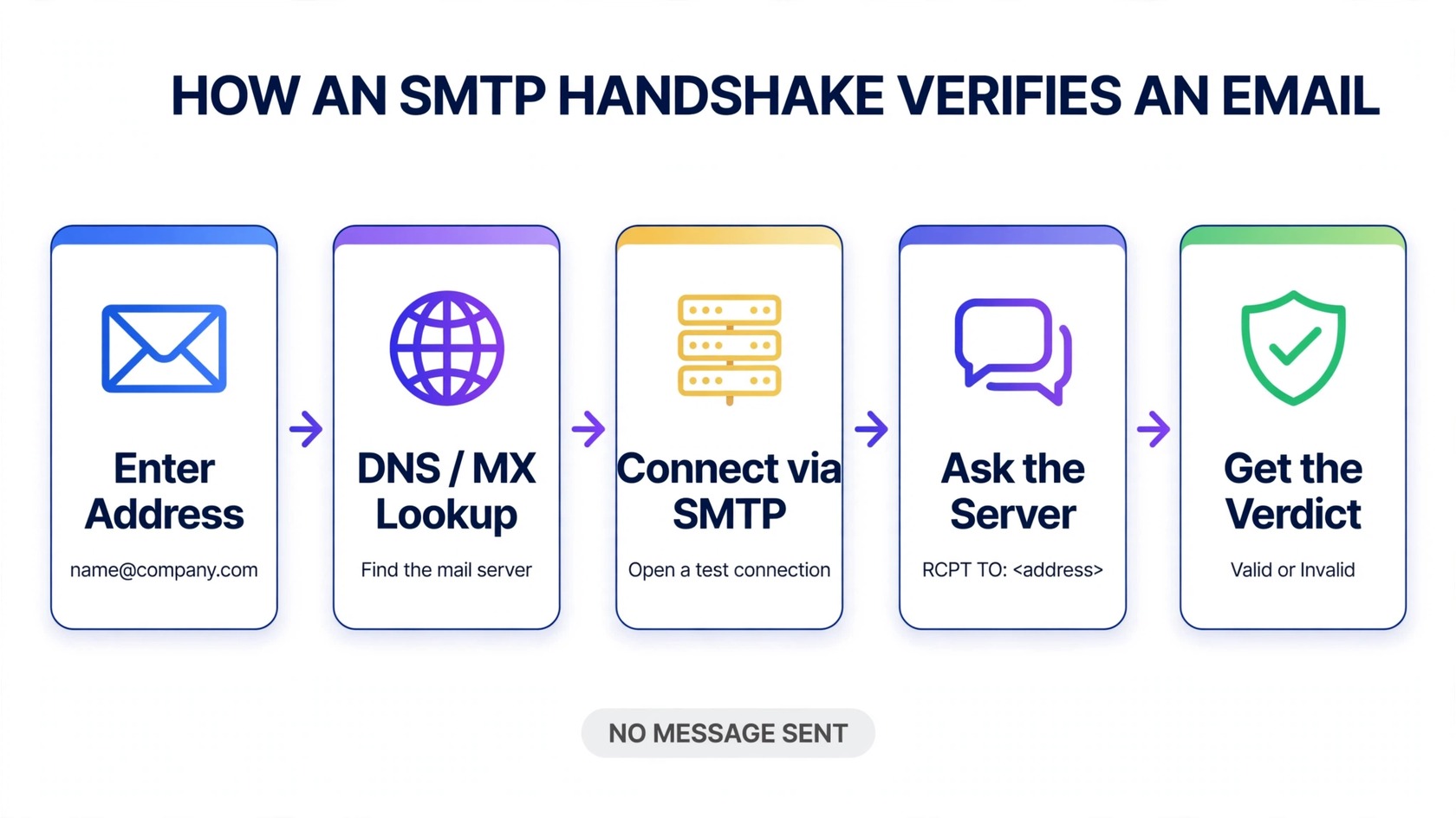
Every domain that can receive email publishes MX records, mail exchange records in its DNS, that tell the internet which servers handle its incoming mail. Looking these up answers a critical question: is there even a mail server behind this address?
You can run an MX lookup with free tools or a single terminal command (nslookup -type=mx domain.com). If the domain has no MX records, or the domain doesn’t exist at all, no mailbox can exist there either, and the address is safe to discard. This catches dead domains, typo’d domains like gmial.com variants of real companies, and abandoned businesses whose web domains expired.
The limitation: a healthy MX record only proves the domain accepts mail. It says nothing about whether the specific mailbox, say, alex.jones@company.com, exists on that server. For that, you need the next method.
Method 3: The SMTP handshake (mailbox ping)
This is the closest thing to asking the mail server directly: “Would you accept mail for this address?” An SMTP handshake opens a connection to the server listed in the domain’s MX records and runs the same conversation a real mail server would, HELO, MAIL FROM, then RCPT TO:<address>, but stops before sending any message body. If the server answers “250 OK” to the recipient, the mailbox exists. If it answers “550 user unknown,” it doesn’t.
This is the most decisive single check you can run without sending, and it’s the core of how professional verifiers confirm mailbox existence. Two caveats worth knowing:
- Catch-all servers say yes to everything. Many corporate servers accept mail for any address at their domain. A handshake can’t distinguish a real mailbox from a catch-all, which is why catch-all detection (Method 6) exists.
- Some servers block or rate-limit handshakes. Gmail and other large providers throttle repeated connections and may greylist unknown senders, so hand-rolled handshake scripts get unreliable at scale and can get your IP flagged. Do it carefully for one-off checks, or let a service with proper infrastructure handle bulk work.
When done right, the handshake is powerful, but it’s one instrument in an orchestra, not the whole band.
Method 4: Detect disposable and temporary email addresses
Disposable email services hand out addresses that work for ten minutes and then die. They pass syntax checks, their domains often have valid MX records, and handshakes confirm the mailbox, right up until the address evaporates and starts bouncing.
Detection works by matching the domain against maintained blocklists of known throwaway providers, plus behavioral signals like domains registered days ago that already receive suspicious volumes of mail. Flagging these before they enter your list matters because disposable addresses are classic spam-trap bait: blocklist operators seed them into scraped lists, and mailing one can get your domain blocklisted.
Method 5: Flag role-based accounts
Addresses like info@, support@, admin@, and sales@ are real mailboxes, they pass every technical check. But they’re shared inboxes, often unmonitored, and they engage at much lower rates. Worse, some blocklist operators run abuse@-style addresses as traps.
Role detection is a simple pattern match on the local part of the address (the bit before the @). It doesn’t mean the address is invalid, it means it deserves a decision. Many senders suppress role accounts from cold outreach while keeping them for transactional mail. Knowing which addresses are role-based lets you make that call instead of discovering it in your bounce and complaint reports.
Method 6: Detect catch-all domains
A catch-all domain is configured to accept mail for any address, whether the mailbox exists or not. This defeats the SMTP handshake completely: the server answers “250 OK” to real.person@company.com and to totally.made.up@company.com alike.
Catch-all detection works by probing: generate a random, almost-certainly-nonexistent address at the same domain and run a handshake on it. If the server accepts the random address too, the domain is catch-all, and every address on it gets flagged as “risky” rather than “valid.” There’s no way to confirm individual mailboxes on a catch-all domain without sending, so the honest verdict is uncertainty, treat these addresses as a separate segment, send to them cautiously, and watch engagement closely.
Method 7: Use a dedicated email verification service
Methods 1 through 6 are all things you can do yourself, for one address at a time, with patience. The moment you have a list of hundreds or thousands, doing them by hand becomes slow, error-prone, and risky: sloppy handshake scripts get your IP throttled, disposable-domain lists go stale, and catch-all probing requires care to avoid looking like an attacker.
A dedicated verification service runs all seven methods as one automated pipeline: syntax, DNS/MX, SMTP handshakes from properly warmed infrastructure, disposable and role detection, and catch-all probing, then returns a clean verdict per address. PureListVerifier is built exactly for this: upload a list, and it checks every address without sending a single email, flagging invalid and risky contacts so you mail only the addresses worth mailing. See the features to understand each check it performs, and check pricing for current plans.
Independent tested comparisons, like Sender.net’s 2026 hands-on roundup of verification tools, confirm the layered approach above is what separates real verification from a simple syntax check. If you’re comparing vendors, our guide to the cheapest email verification tools shows what each tier of service actually buys you.
What no single method can do alone
Here’s the honest part most tutorials skip: every method above has a blind spot, and they’re the blind spots the other methods cover. Syntax checks can’t see dead mailboxes. MX lookups can’t see individual inboxes. Handshakes can’t see catch-alls. Disposable detection can’t catch a real address whose owner abandoned it years ago. Role detection flags addresses that might still convert. No single check is the answer, the answer is the stack.
The order matters too. Run cheap, fast checks first (syntax, MX) and expensive ones later (handshakes, catch-all probing) so you never waste effort on addresses that fail early. That’s exactly the sequencing professional verifiers use, and it’s the reason a manual approach that works fine for five addresses falls apart at five thousand. For the bigger picture on why this whole process exists, read what email verification is.
FAQs
How can I verify an email address without sending an email to it?
Use a layered check: validate the syntax, look up the domain’s MX records, run an SMTP handshake to ask the mail server if the mailbox accepts delivery, and screen for disposable addresses, role-based accounts, and catch-all domains. A dedicated verification service automates all of these steps at once.
Is it safe to ping a mail server with an SMTP handshake?
For occasional one-off checks, yes, you’re opening a connection and closing it before any message is sent, which is standard mail-server behavior. At volume, however, repeated handshakes can get your IP throttled or flagged, which is why bulk verification belongs on properly managed infrastructure.
Can I verify a Gmail address without sending an email?
Partially. Syntax, MX, and disposable checks work fine, but Gmail aggressively throttles direct SMTP handshakes from unknown IPs, so manual mailbox pings are unreliable there. Verification services use established sending infrastructure and fallback signals to assess Gmail addresses more accurately.
What’s the difference between checking MX records and verifying an email?
An MX lookup only proves the domain has a mail server, it says nothing about the specific mailbox. Full verification goes further: it handshakes with that server to confirm the individual address accepts mail, then layers on risk checks for disposable, role-based, and catch-all addresses.
Do catch-all domains make verification impossible?
They make individual mailbox confirmation impossible without sending, the server accepts everything. But catch-all detection flags the whole domain as “risky,” so you can segment those addresses, mail them cautiously, and measure engagement instead of blindly trusting a “valid” verdict.
Are free email verification methods reliable?
They’re reliable for what they check and blind to what they don’t. A free MX lookup genuinely proves a domain receives mail; it genuinely cannot prove a mailbox exists. Free methods are great for spot-checking single addresses, for lists, combine them or use a service that runs the full stack.
Can verifying without sending hurt my sender reputation?
Done properly, no, that’s the entire point. You never send a message, so there’s no bounce, no complaint, and no spam-trap hit. The only risk is running aggressive handshake scripts from your own IP at scale, which can trigger throttling; verification services exist precisely to absorb that risk for you.
The bottom line
Verifying an email address without sending one is a solved problem, as long as you use all seven methods together: syntax, DNS/MX, SMTP handshake, disposable detection, role-account flagging, catch-all detection, and, for real lists, a verification service that runs the whole pipeline. One check is a guess; seven checks are a verdict. Stop guessing before your next send: verify your list with PureListVerifier and mail only the addresses that deserve your message.
