

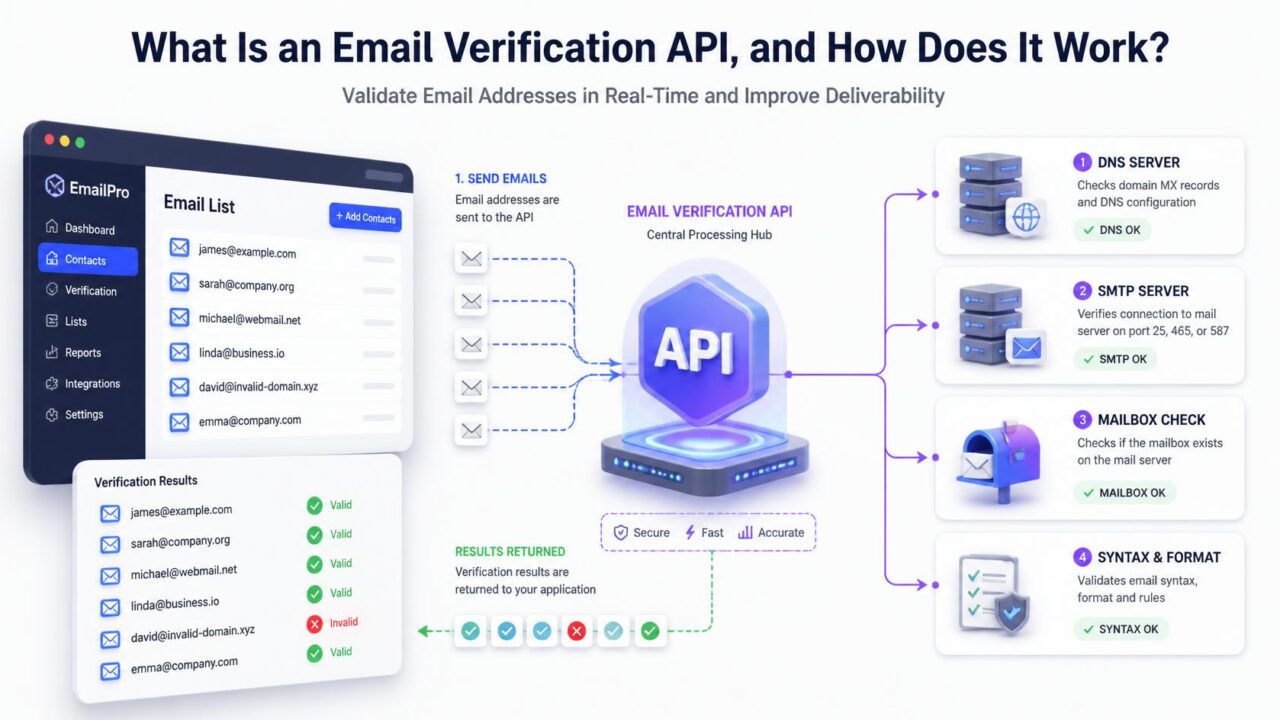
Quick answer: an email verification API is a small, direct request your website or app sends to a verification service the instant someone submits an email address, and it gets a valid, invalid, or risky answer back in well under a second, typically 100-800 milliseconds depending on the provider and the destination mail server. It does the same core check as verifying a list in bulk, but one address at a time, live, before that address ever gets saved to your database.
What an API actually is, in plain terms
API stands for application programming interface, which is just a formal way of saying “a way for two pieces of software to talk to each other automatically.” An email verification API is a specific address on the internet that your signup form, checkout page, or app can send an email address to, and it sends back a structured answer: valid, invalid, risky, disposable, or catch-all, usually within a second. Your developer connects this once, and from then on, every new signup gets checked automatically without anyone touching it manually.
Why this matters more than it might seem
A signup form is often the very first interaction someone has with your product, and it’s also the exact moment a typo, a disposable address, or an automated bot submission is easiest to catch, since the person (or script) is still right there. Once that address is saved to your database and treated as a real contact, catching the same problem later means waiting for a bounce, digging through campaign reports, or running a separate cleanup project. An API check moves that catch to the earliest, cheapest possible moment, which is exactly why it’s become a standard part of serious signup flows rather than a niche technical add-on.
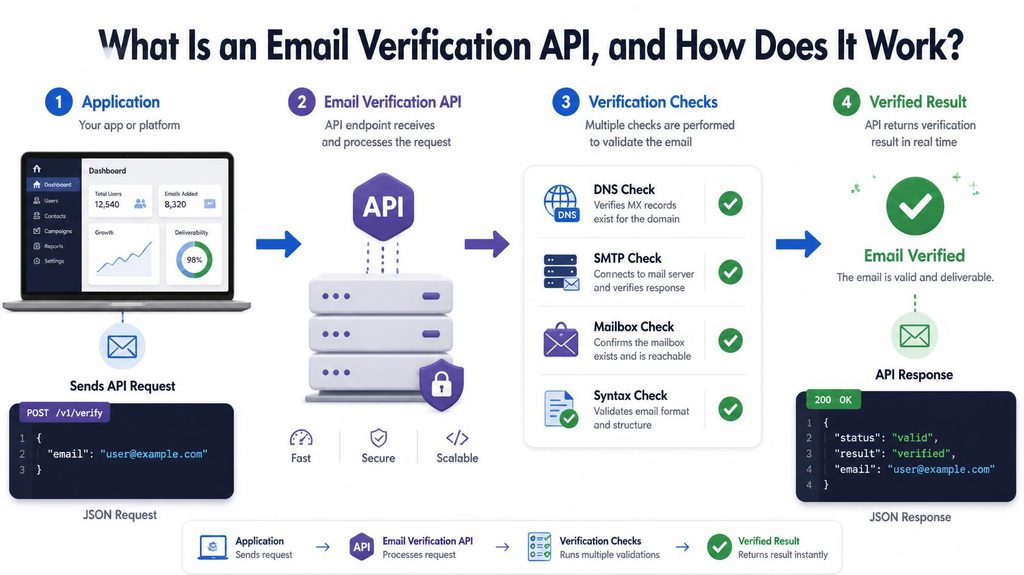
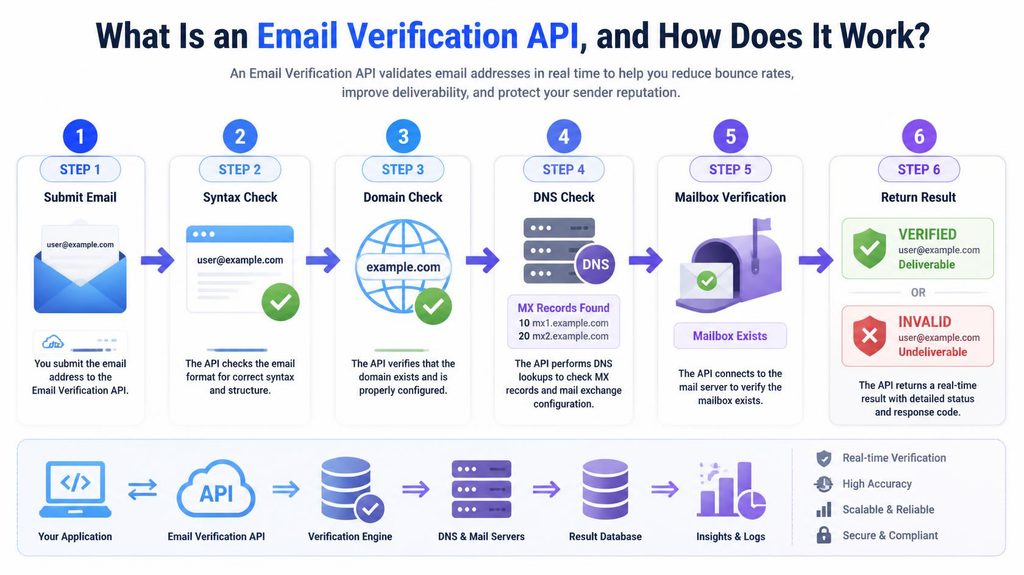
How the check actually happens, step by step
- Someone types an email address into your form and either submits it or, on well-built forms, moves to the next field.
- Your form sends that address to the API as a request, essentially asking “is this address real?”
- The API runs through its checks — format, domain, mail server, and mailbox existence, using the same SMTP protocol handshake a real delivery attempt would — the same layered process covered in how email verification actually works.
- The API sends back a result, usually as a small structured response your form can read automatically, valid, invalid, risky, or disposable.
- Your form reacts to that result, either letting the signup through, showing an error, or flagging it for review, depending on how strict you’ve set it up.
How fast is this, really?
Fast enough that most people never notice it happened. Published benchmarks across several verification providers, including Abstract API and QuickEmailVerification, put typical response times somewhere between 100 milliseconds and 1.2 seconds per address, with most falling in the 300-800 millisecond range depending on how quickly the destination mail server responds. A common implementation pattern is to wait until the person finishes typing, using a short debounce delay of 400-800 milliseconds, before firing the request, which keeps the check invisible during normal typing speed.
Where does the actual delay come from?
The delay isn’t really coming from the verification provider’s own processing, that part is fast and consistent. It comes almost entirely from the destination mail server’s own response time, which the verification provider has no control over. A large, well-resourced mail server, like Gmail or Outlook’s infrastructure, tends to respond quickly and predictably. A smaller, less optimized mail server can take noticeably longer to answer, which is why the same API can feel instant for one address and slightly slower for another, even though the checking logic itself didn’t change at all.
Does it ever slow down or break the form?
It can, if it’s implemented carelessly, which is the main real risk worth planning for. A poorly built integration that blocks form submission entirely while waiting on a slow or unresponsive API call can make a form feel broken to a frustrated user. The more resilient pattern most experienced teams use is to allow the submission to go through if the API times out or fails, and flag that specific address for a follow-up check later, rather than blocking a real, paying customer over a temporary API hiccup.
API versus bulk verification: two different jobs
| API (real-time) | Bulk | |
| When it runs | The moment someone submits a form | Whenever you upload a list to check |
| What it checks | One address at a time | Thousands or millions at once |
| Main job | Stop bad addresses from ever entering your database | Clean addresses already sitting in your database |
| Typical setup | A developer wires it into your form once | Upload a CSV, download the results |
See the fuller comparison in real-time vs bulk email verification if you’re trying to decide which one your situation actually calls for. Most active senders eventually use both, an API for new signups going forward, and periodic bulk checks for the list that’s already accumulated.
What happens behind the scenes during that second
Even though the whole exchange takes under a second from your form’s perspective, the API is doing real work in that window: confirming the domain exists and has a working mail server, then contacting that server directly to ask whether it would accept mail to the specific address, the same layered approach used in bulk verification, just compressed into a live request-response cycle instead of running across a whole uploaded file. This is also why response times vary between providers and even between different addresses on the same provider, since some destination mail servers simply respond faster than others, and that’s outside any verification service’s direct control.
What a typical API response actually contains
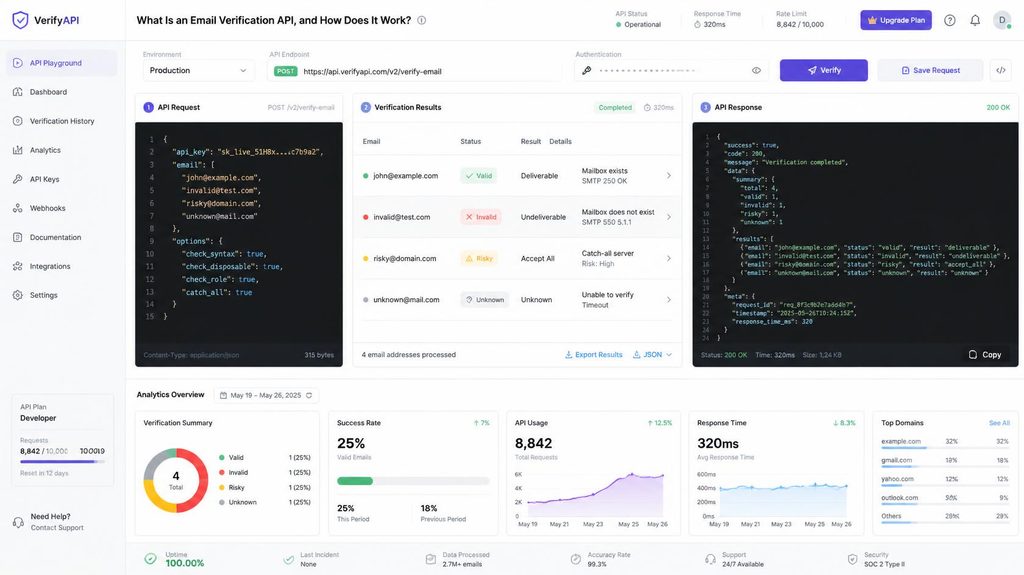
Beyond a simple yes or no, most verification APIs return a small set of structured fields you can act on programmatically: a status (valid, invalid, risky, unknown), whether the domain is disposable, whether it’s catch-all, and sometimes a confidence score. This structure is what lets a developer build different behavior for different results, for example, blocking clearly invalid addresses outright while letting catch-all results through with a note for later review, rather than treating every non-perfect result the same way.
A real example of what this catches
Picture a SaaS signup form with no verification at all. Over a month, alongside genuine customers, it collects a scattering of typo’d addresses (gmial.com instead of gmail.com), a handful of disposable addresses from people who just wanted a free trial without giving a real inbox, and a few outright fake entries from bots testing the form. None of this shows up as a problem until the first onboarding email campaign goes out and a noticeable chunk of it bounces, by which point those bad addresses have already been sitting in the database, skewing signup metrics and diluting engagement reporting for weeks. An API check at the point of signup would have caught the typos and disposables in real time, with the person still on the page to correct their entry, rather than discovering the problem a month later spread across a whole campaign.
What kind of businesses actually need this
An API-based check earns its keep fastest for any business with an ongoing, public signup flow: SaaS products with free trials, e-commerce stores collecting emails at checkout or for newsletters, lead-generation forms on marketing sites, and membership or community platforms. The common thread is volume and exposure, a public form that anyone, including bots and people who mistype their own address, can submit to repeatedly. A business collecting emails manually through sales conversations or one-on-one signups has far less exposure to this specific problem, since a human is already present to catch an obvious typo before it’s saved anywhere.
Do you need an API, or is bulk checking enough?
If you’re actively collecting new signups through a form, an API closes a gap that bulk checking alone can’t: it stops bad addresses before they ever get saved, rather than cleaning them up after the fact. If your list is essentially static, imported occasionally rather than growing through an ongoing signup flow, bulk checking on its own may be all you need. See how to actually add this to your signup form for the practical setup steps once you’ve decided an API makes sense for you.
Frequently asked questions
How fast is an email verification API?
Typically 100 milliseconds to just over a second per address, depending on the provider and how quickly the destination mail server responds. Most implementations keep this invisible to the person filling out the form.
Does an API slow down my signup form?
Not if it’s implemented well. A short debounce delay after someone finishes typing, combined with allowing submission through on a timeout rather than blocking it, keeps the check from ever feeling like friction.
Is an email verification API the same thing as bulk verification?
No. They run the same underlying checks, but an API checks one address the instant it’s submitted, while bulk verification checks an entire existing list at once. Most active senders use both for different purposes.
What happens if the API call times out?
A well-built integration lets the form submission through anyway rather than blocking a real user, and flags that address for a follow-up check later. Blocking signups entirely over a temporary API delay costs you real conversions.
Do you need an API if you already check your list in bulk?
If your list keeps growing through an active signup form, yes, an API stops new bad addresses from entering in the first place, which bulk checking alone can’t do since it only cleans up what’s already there.
How much does an email verification API typically cost?
Pricing generally follows the same per-address model as bulk verification, since it’s the same underlying check. See what drives email verification pricing for the fuller breakdown of typical costs.
Can a non-technical person set up an API integration?
Usually not entirely alone, since it involves connecting your form’s code to an external service, but many form builders and website platforms have plugins or built-in options that handle much of the technical work. See how to add email checking to your signup form for what this typically involves on common platforms.
Does adding an API check reduce genuine signups?
It can, if configured too strictly, particularly around catch-all or unusual-but-valid addresses. Most well-designed implementations warn rather than hard-block on ambiguous results, which limits this risk while still catching the clearly bad addresses.
Where to start
If you’re losing signups or building a database with an unknown share of bad addresses, an API closes that gap going forward. PureListVerifier checks addresses whether you’re running them one at a time through an integration or in bulk across an existing list.

1 comment